Audit User and Group Permissions Across Apps in Microsoft Dynamics 365 Business Central v28

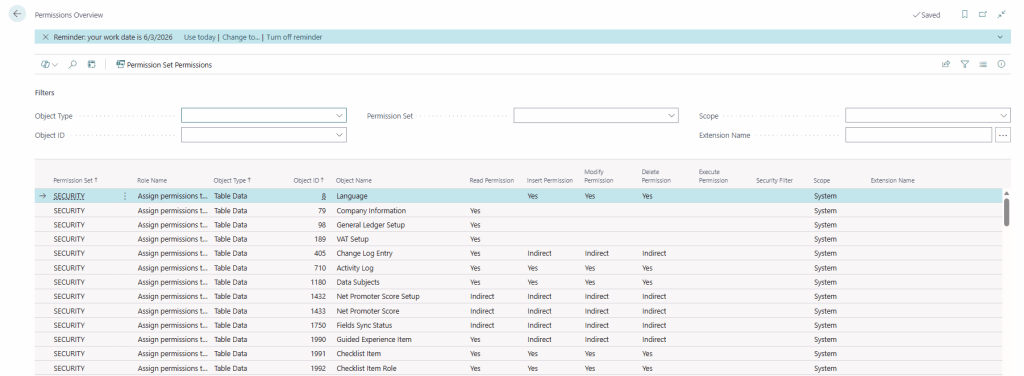
With Business Central 2026 release wave 1 (v28), Microsoft introduces a powerful new capability — the Permissions Overview page, providing a centralized view of permissions across all apps and extensions.

This feature significantly improves how administrators analyze, audit, and troubleshoot security configurations in complex environments.

In earlier versions, analyzing permissions was fragmented and time-consuming:

  • Permissions spread across multiple apps and extensions
  • No single view to understand who has access to what
  • Difficult to trace Which permission set grants access and Which users or groups are assigned.

What’s New in BC28?

The Permissions Overview page provides a unified and centralized view of all permission sets across:

  • Base application
  • Installed extensions
  • Custom apps

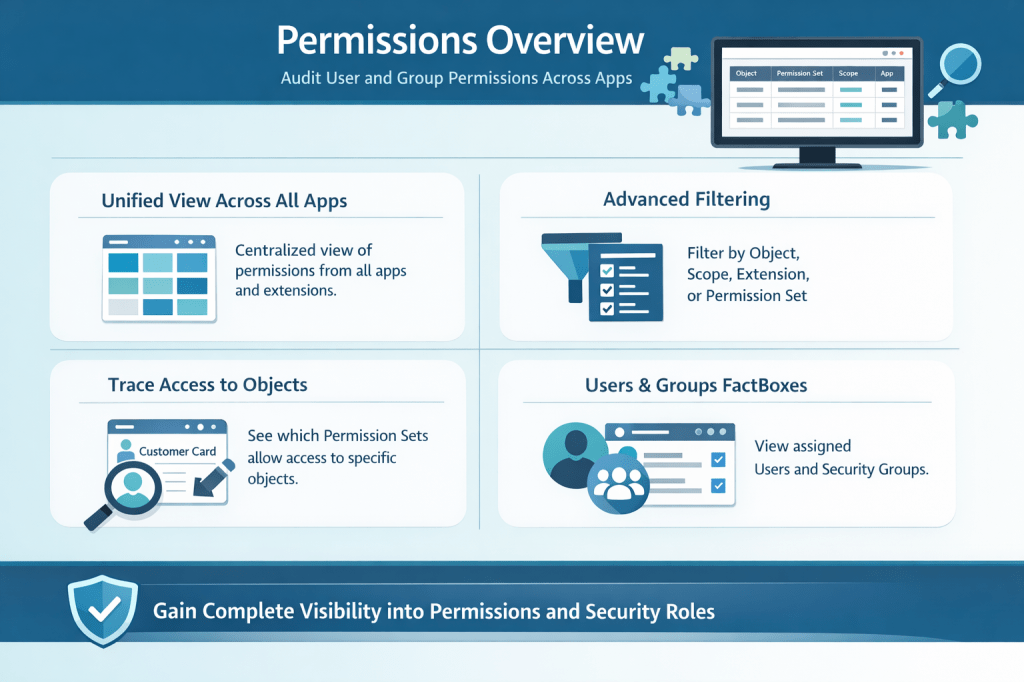
1. Unified View Across All Apps

The Permissions Overview page provides a centralized view of permissions across all apps and extensions, eliminating the need to navigate multiple sources to understand access configurations.


2. Advanced Filtering

Administrators can efficiently filter permissions by object type, scope, extension, or permission set, enabling quick and precise identification of relevant access rights.


3. Trace Access to Specific Objects

The system allows you to easily determine which permission sets grant access to a specific object, providing clear visibility into how permissions are assigned.


4. FactBoxes for User and Group Assignment

Built-in Fact Boxes display the users and security groups associated with each permission set, offering complete transparency into access assignments.

This will help administrator for

1. Improved Security Auditing

The new Permissions Overview enables administrators to perform faster and more accurate security audits by clearly identifying excessive permissions, detecting unused or redundant permission sets, and validating compliance requirements with greater confidence.


2. Simplified Troubleshooting

When users encounter access issues, administrators can quickly search for the relevant object, identify the required permission sets, and verify user or group assignments, significantly reducing the time required to resolve issues.


3. Better Dependency Analysis

In environments with multiple extensions, where overlapping permissions are common, this feature helps identify conflicts, understand permission dependencies, and avoid duplication, leading to a more structured and maintainable security model.

4. Better Governance and Compliance

This feature supports stronger governance by enabling efficient internal audits, simplifying external compliance checks, and ensuring that role-based access is aligned with organizational policies.


5. Improved Role Design

Functional consultants can design cleaner and more effective permission sets by avoiding over-per missioning and aligning access rights closely with business roles and responsibilities.


6. Enhanced User Management

Administrators gain complete visibility into who has access, why they have access, and through which permission sets, resulting in better control and transparency over user permissions.

The Permissions Overview page in Microsoft Dynamics 365 Business Central v28 is a major step forward in security management and transparency.

It transforms permission analysis from a fragmented process into a centralized, efficient, and user-friendly experience.

Implicit Record and Record Ref Conversion in Business Central AL

When working with Microsoft Dynamics 365 Business Central, one of the most powerful capabilities is the dynamic handling of data using RecordRef. However, as a developer, you may have run into scenarios where you need to switch between the strongly typed Record and the flexible RecordRef—and wondered if there’s a clean way to do it.

Good news: Business Central now supports implicit conversion between Record and RecordRef

📘 Understanding the Core Types:

Before exploring the implicit conversion, it’s crucial to understand the distinct roles of Record and RecordRef:

  • Record: A strongly-typed variable that represents a specific table in the Business Central database. The compiler enforces type safety, ensuring that operations performed on a Record variable are valid for the defined table structure.
  • RecordRef: A more dynamic variable that provides a generic reference to any table in the Business Central database. It allows for runtime manipulation of table structures and data, often used in scenarios like generic data access, metadata exploration, and dynamic query building.

Implicit Conversion – What’s New?

With recent updates, AL now supports implicit conversion:

  • From a Record to a RecordRef
  • From a RecordRef back to a Record (if the types match)

This means cleaner, safer, and more readable code without the boilerplate RecordRef.GetTable() or RecordRef.SetTable().

🔍 Example: Record to RecordRef

procedure LogAnyRecord(rec: RecordRef)
begin
    Message('Table ID: %1', rec.Number);
end;

procedure RunLogging()
var
    customer: Record Customer;
begin
    customer.Get('10000');
    LogAnyRecord(customer); // Implicit conversion from Record to RecordRef
end;

No need for recRef.SetTable(customer) — it’s handled under the hood.

🔄 Example: RecordRef to Record

procedure GetCustomerName(recRef: RecordRef): Text
var
    customer: Record Customer;
begin
    customer := recRef; // Implicit conversion from RecordRef to Record
    exit(customer.Name);
end;

Implicit conversions between Record and RecordRef bring AL language making it easier to write dynamic yet type-safe code. While it’s a small feature on the surface, it greatly enhances developer productivity and code clarity.

Stay Tuned for more updates.

Unlock the Potential of Microsoft Dynamics 365 at Directions Asia 2024

Are you ready for Directions Asia 2024?

Directions Asia 2024 poised to be a significant conference for those in the SMB market, focusing on the latest advancements in ERP, CRM, and Cloud solutions. Attendees will have the opportunity to learn how to leverage powerful tools such as the Microsoft Power Platform, Microsoft Dynamics 365 Business Central, and Azure to unlock their full technological potential.

Key Aspects to Look Forward to:

  1. State-of-the-Art Keynotes: Industry leaders and experts will present the latest trends and innovations in ERP, CRM, and Cloud technologies. These sessions will provide insights into how SMBs can stay competitive and efficient by adopting these solutions.
  2. In-Depth Sessions: Breakout sessions and workshops will offer deep dives into specific aspects of Microsoft Power Platform, Dynamics 365 Business Central, and Azure. Participants can expect practical demonstrations, case studies, and best practices to help them implement and optimize these technologies.
  3. Networking Opportunities: The event will provide a platform for professionals to connect, share experiences, and collaborate. This is an excellent opportunity to meet peers, industry leaders, and potential partners.
  4. Hands-On Experience: Labs and interactive sessions will allow attendees to get hands-on experience with the latest tools and technologies. This practical approach helps in better understanding and applying the knowledge gained.
  5. Focus on SMBs: The sessions are tailored to address the specific challenges and opportunities faced by small and medium-sized businesses, ensuring that the content is relevant and actionable for this audience.

Key Technologies Highlighted:

  • Microsoft Power Platform: Learn how to use Power Apps, Power BI, and Power Automate to create custom business solutions, automate processes, and gain valuable insights from your data.
  • Microsoft Dynamics 365 Business Central: Discover how this comprehensive business management solution can streamline operations, improve customer interactions, and drive growth.
  • Co Pilot AI: A cutting-edge AI technology that provides intelligent assistance across Microsoft applications. Co Pilot AI helps businesses automate routine tasks, gain insights from data, and improve customer interactions, ultimately enhancing productivity and decision-making.
  • Microsoft Azure: Explore how Azure’s cloud services can enhance your IT infrastructure, provide robust security, and offer scalable solutions to meet your business needs.

Schedule

Directions ASIA 2024, held at the Avani+ Riverside Bangkok Hotel on May 16-17, features a packed schedule of keynotes, sessions, and workshops focused on ERP, CRM, and Cloud solutions. Highlights include sessions on Microsoft Dynamics 365 Business Central, Power Platform, Azure, and AI integration. The event offers ample networking opportunities and practical insights tailored for SMBs looking to enhance their technological capabilities.

For more details on the schedule and specific sessions, you can visit the official Directions ASIA 2024 schedule.

Venue:

Avani+ Riverside Hotel 257 Charoen Nakhon Rd, Samre, Thon Buri, Bangkok 10600, Thailand

This is one of the wonderful venue for Directions Asia 2024. Situated along the Chao Phraya River, it offers stunning views and excellent facilities, making it a perfect location for a conference of this scale.

In my view Directions Asia 2024 is an excellent opportunity for SMBs to gain cutting-edge knowledge and tools to drive their business forward using Microsoft’s powerful technology stack.

Looking forward to seeing you at Directions Asia 2024!

NAV Tech Days Recorded Session

NAV TechDays is the name of a conference, organized by mibuso.com. This conference meant  technical only and highly relevant – sessions, related NAV and Business Central.

NAV TechDays is the place where some of the best developers and MVP’s exchange ideas and provides more insight of NAV world (oops Business Central)

Few of the session which I think more useful for everybody which listed here on my blog and you can visit them

Practical approaches for upgrading your NAV database and moving to extensions

The future for developers and consultants

Performance: Business Central reloaded for the Cloud

What’s new in Developing for Business Central

Evolution of a titan: a look at the development of NAV from an MVP angle

Business Central: The new face of the client

Crazy mix of integrations: Dynamics 365 Business Central and Azure services

Hope you guys will find it useful